An applicant tracking system, or ATS, is software that helps companies manage the hiring process. It brings job applications, resumes, candidate information, interviews, communication, and hiring decisions into one place.
Instead of managing candidates through emails, spreadsheets, and separate folders, recruiters can follow a clear process through one system.
But an ATS does much more than store resumes. It can support almost every stage of recruitment, from publishing a job to making a hiring decision.
What makes an Applicant Tracking System Important?
An applicant tracking system gives recruiters one place to collect applications, store resumes, review candidates, schedule interviews, and track progress.
When a company receives applications for a job, the ATS keeps the information organized so recruiters do not have to manage everything manually. Depending on the system, it can also help with resume screening, candidate communication, reporting, and recruitment tasks.
An ATS does not simply track applications. It creates a structured process that helps hiring teams know who applied, where each candidate is in the process, and what action needs to happen next.
How does an Applicant Tracking System Work?
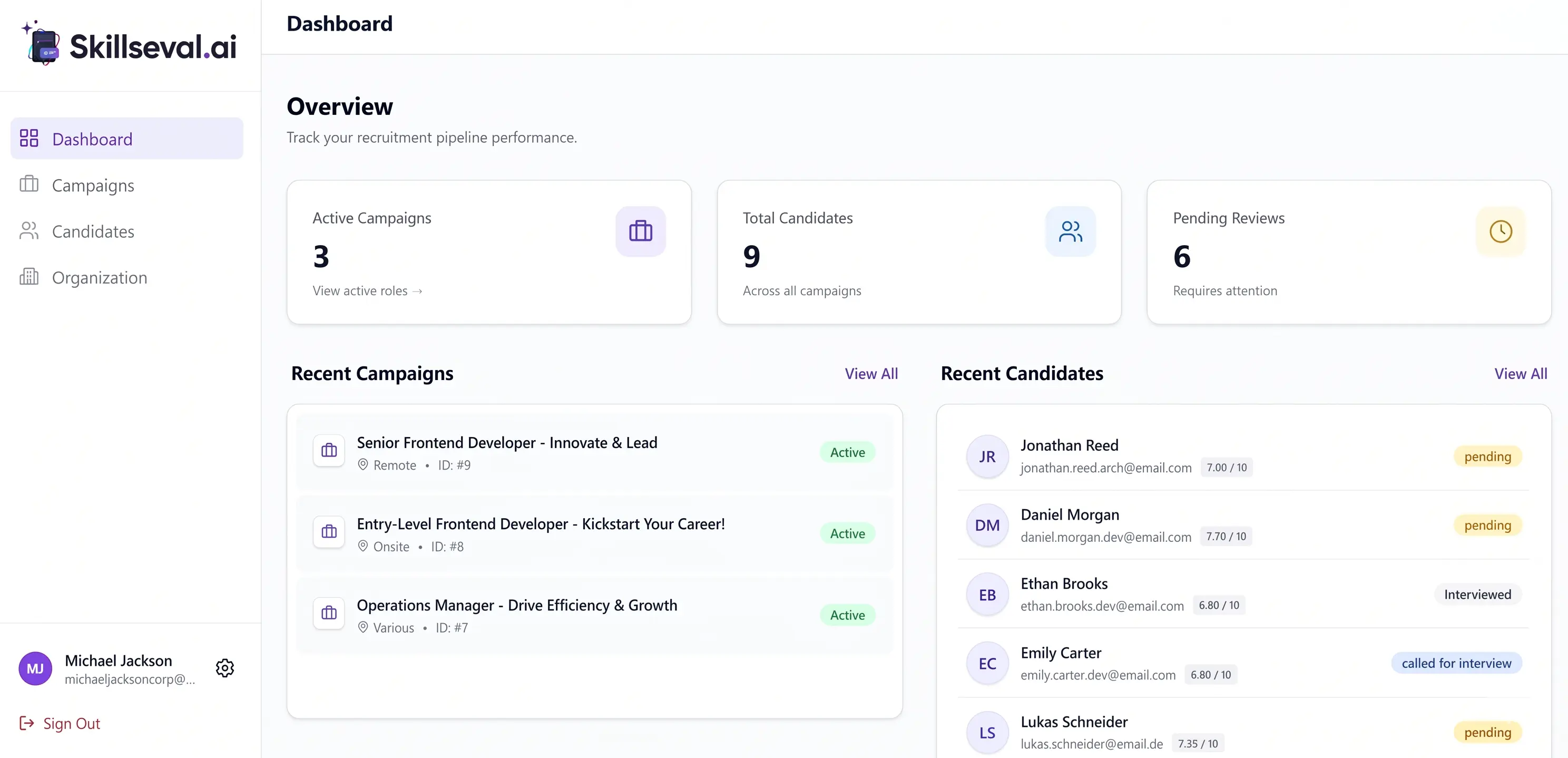
An Applicant Tracking System (ATS) brings job posting, applications, resumes, screening, interviews, communication, feedback, and hiring decisions into one system. Instead of recruiters manually moving information between spreadsheets and emails, the ATS records each stage and keeps candidate information organized.
Here is how a streamlined ATS workflow functions from start to finish.
1. The recruiter creates a job opening
The process starts when a recruiter or hiring manager creates a job in the ATS with required skills, qualifications, and salary details. Once approved, the ATS publishes it directly to the company's career page and connected job boards, creating a central hub for all incoming applications.
2. Candidates submit their applications
Applicants apply via job boards, agency links, or career pages. The ATS captures their resumes, contact details, and screening answers into a central location. It also logs application sources so recruiters can see which channels perform best.
3. The ATS collects and organizes candidate information
The ATS builds or updates candidate profiles with work histories, skills, interview notes, and status updates. If a candidate applies again in the future, the system links the new application to their existing profile to maintain a clean database.
4. The ATS parses resumes
Resume parsers read uploaded files and extract details like job titles, dates, and education into standardized fields. Clean, standard resume formatting helps the system accurately convert unstructured text into searchable data.
5. The ATS screens and organizes candidates
The platform helps screen applicants by matching their qualifications against job requirements. It highlights relevant experience or ranks profiles to help recruiters prioritize reviews, acting as a helpful filter rather than a replacement for human judgment.
6. Recruiters review candidate profiles
Recruiters evaluate the organized profiles, reviewing resumes, answers, and screening insights. Candidates who meet the qualifications advance to the next round, while others are notified or saved for future roles.
7. Candidates move through different hiring stages
The system tracks applicants through clear stages, such as initial screen, technical test, interview, and offer. This gives hiring managers real-time visibility into where every candidate stands and prevents applicants from slipping through the cracks.
8. The ATS supports interview scheduling and communication
Recruiters use integrated tools to share calendar availability, schedule interviews, and send automated reminders. Storing all communication history within the platform ensures candidate interactions stay transparent and organized.
9. Hiring managers provide feedback
Interviewers log scorecards and notes directly into the candidate's profile instead of sending separate emails. This creates a clear, shared record that speeds up decision-making between recruiters and managers.
10. The company makes a hiring decision
Once a final candidate is chosen, the ATS supports generating offer letters, routing approvals, and collecting e-signatures. Unsuccessful candidates are moved to talent pools for future opportunities.
An ATS does not make final hiring decisions, but it automates administrative work, organizes candidate data, and helps recruitment teams collaborate faster.
When does a company need an ATS?
A company needs an Applicant Tracking System (ATS) when managing hiring manually becomes a bottleneck to growth or leads to a poor candidate experience.
Here are the key indicators that it is time for a company to adopt an ATS:
- High Hiring Volume: The company is filling multiple roles simultaneously or planning a rapid team expansion (e.g., scaling headcount by 20% or more over a year).
- Overwhelming Resume Volume: Job postings consistently generate dozens or hundreds of applications, making manual sorting and data entry unsustainable for recruiters.
- Multiple Stakeholders Involved: Several hiring managers, department heads, and recruiters need to collaborate, share feedback, and review candidates without drowning in disjointed email chains.
- Sluggish Time-to-Hire: Candidates are dropping out of the process or accepting competing offers because manual interview scheduling, follow-ups, and feedback cycles take too long.
- Compliance & Data Privacy Requirements: The organization operates in regions with strict data management laws (like GDPR) or needs standardized tracking for equal opportunity employment reporting.
- Poor Candidate Communication: Applicants are slipping through the cracks, resulting in missed interviews, unread messages, or ghosted candidates that damage the company's employer brand.
- Lack of Recruitment Data: Leadership wants clear visibility into hiring metrics, such as cost-per-hire, time-to-hire, and the ROI of different job boards, but lacks the data to measure them.
While a tiny business making one or two hires a year can easily manage with spreadsheets and an email inbox, most growing organizations hit a tipping point where an ATS transitions from a "nice-to-have" to an essential operational tool.
What are the Benefits of an ATS?
Here are 7 benefits of using an Applicant Tracking System:
Saves Massive Amounts of Time
Instead of manually copying candidate details into spreadsheets or digging through cluttered email folders, the ATS centralizes everything automatically. This frees up your recruitment team to spend time on what actually matters: engaging with top candidates.
Speeds Up Time-to-Hire
By streamlining every stage - from automated job posting to instant interview scheduling - an ATS removes common bottlenecks in your hiring pipeline. You can move qualified applicants through the process rapidly before your competitors snatch them up.
Improves Candidate Experience
Nobody likes being left in the dark after applying for a job. With automated updates, clear stage tracking, and seamless communication tools, candidates stay informed every step of the way, leaving a stellar impression of your employer brand.
Centralizes Communication and Feedback
No more lost email chains between recruiters and hiring managers! An ATS allows interviewers to leave notes, scorecards, and feedback directly on candidate profiles, making team collaboration completely effortless and transparent.
Boosts Quality of Hire
With built-in screening tools, customized application questions, and resume parsing, the ATS helps you identify and prioritize the most qualified applicants right away, ensuring only the best fits make it to the interview stage.
Creates a Reusable Talent Pool
Unsuccessful for this role? No problem. The ATS automatically archives qualified applicants in a searchable database. When a new role opens up, you can instantly tap into your existing talent pool instead of starting your search from scratch.
Delivers Data-Driven Hiring Insights
Track what's working and what isn't with built-in analytics. An ATS gives you detailed reports on your best applicant sources, drop-off points, and time-to-hire metrics, helping you continuously sharpen your recruitment strategy over time.
If you are struggling to manage candidates through messy spreadsheets, endless email threads, and lost applications, then adopting an ATS is the smartest move you can make.
Not only will you be able to cut your administrative workload in half, but you will also help your team hire top-tier talent much faster.
How did AI Revolutionize the Applicant Tracking System?
Artificial intelligence has completely transformed Applicant Tracking Systems from boring, passive databases into smart, helpful recruitment sidekicks.
Here is how AI has changed the recruitment game for the better:
Smart Resume Screening
Old-school ATS platforms rely on rigid keyword searches, often ditching great candidates just because they used different wording. AI uses smart language processing to read resumes like a human does. It gets that an "Operations Lead" or "Project Coordinator" might have the exact skills you need for a "Program Manager" role, making sure great talent doesn't fall through the cracks.
Instant Candidate Matching and Ranking
Instead of digging through a mountain of hundreds of applications, AI algorithms do the heavy lifting for you. The system looks at candidate skills, career paths, and screening answers, then scores and ranks applicants. It instantly highlights top matches so you know exactly who to reach out to first.
Rediscovering Hidden Gems in Your Database
Why spend money on new job ads when you already have great candidates in your system? AI scans external candidate profiles, but it also dives into your past database to rediscover awesome "runners-up" from previous hires and matches them to your new roles automatically.
Automated Scheduling
AI chatbots and virtual assistants make life easier for both you and your candidates. They answer candidate questions 24/7, check basic qualifications, sync up with your team's calendars, and let applicants pick their own interview slots in seconds. No more tedious back-and-forth emails!
Fairer, Unbiased Screening
AI can help keep hiring objectives by creating "blind" candidate profiles. It automatically hides extra details like names, ages, photos, and addresses before your team reviews them, helping everyone focus purely on real skills, qualifications, and experience.
Helpful Data and Smart Insights
Instead of just tracking where candidates are in the pipeline, AI uses past hiring data to predict what's coming next. It can help you figure out how likely a candidate is to accept an offer, estimate how long a role will take to fill, and show you which job boards actually bring in your best hires.
Where traditional ATS platforms just stored resumes and hunted for exact keyword matches, AI-driven systems actually understand context, predict who will be a great fit, and handle the tedious busywork for you.
Use Cases for an ATS
An Applicant Tracking System isn't just built for full-time recruiters. Different roles across an organization interact with an ATS daily, each gaining specific advantages that streamline their workload.
In-House Recruiters & Talent Acquisition Teams
Recruiters and hiring teams use ATS to post job openings, source candidates, review parsed resumes, schedule interviews, and manage the candidate pipeline. It eliminates manual administrative tasks, reduces time-to-hire, and prevents qualified applicants from getting lost in a cluttered inbox.
Executives & HR Leadership
It helps leadership track high-level recruitment metrics, assess hiring budget efficiency, and review workforce growth projections. It provides clear reports on cost-per-hire, channel ROI, and hiring bottlenecks, making it easy to align recruitment strategies with company goals.
Recruitment Agencies & Staffing Firms
Agencies and hiring firms use them to manage candidate databases across multiple client accounts, track candidate placements, and organize client submission lists. It keeps candidate data structured and searchable, enabling recruiters to match qualified talent to client openings instantly.
Job Candidates
Candidates use them to submit job applications, complete screening questionnaires, schedule interview slots, and track application status. It ensures a smooth, transparent application process with timely updates and automated interview reminders.
How to Choose the Right ATS for Your Company?
Here is a step-by-step guide to evaluating and choosing the right ATS for your organization.
Assess Your Current Hiring Needs and Pain Points
Before shopping for software, audit your existing hiring workflow. Identify the exact bottlenecks you are trying to solve.
- Volume: Are you hiring 5 people a year or 500? High-volume hiring requires automation and mass bulk actions, while specialized technical hiring needs strong candidate search and sourcing tools.
- Team Structure: Who will use the tool daily? Decide whether your priority is recruiter efficiency, hiring manager simplicity, or executive-level analytics.
- Gaps: Pinpoint where your current process breaks down (e.g., slow feedback collection, candidate drop-off, or manual interview scheduling).
Determine Must-Have Features vs. Nice-to-Haves
Avoid paying for shiny features your team won't use. Categorize potential ATS capabilities based on your core requirements:
- Core Essentials: Resume parsing, career page builder, multi-board job posting, email templates, and centralized candidate profiles.
- Automation & Efficiency: Automated screening questionnaires, self-service interview scheduling, and automated stage updates.
- Advanced & AI Capabilities: AI resume matching, automated candidate ranking, advanced reporting dashboards, and candidate relationship management (CRM) talent pools.
Verify Key Integrations
An ATS should not exist as an isolated island. It must integrate seamlessly with the software tools your company already uses every day:
- HRIS & Payroll: Systems like Workday, BambooHR, or Gusto for smooth onboarding handoffs.
- Communication & Calendars: Google Workspace or Microsoft 365 for seamless email logging and calendar invites.
- Sourcing & Assessment Tools: LinkedIn Recruiter, Slack/Teams (for feedback alerts), and skill assessment platforms (e.g., HackerRank, TestGorilla).
Evaluate User Experience (UX) and Mobile Accessibility
If an ATS is overly complex, hiring managers will bypass it and return to email chains.
- For Recruiters & Managers: Request a live demo to test how intuitive the interface is. Drag-and-drop pipeline stages, easy feedback submission, and simple search functionality are crucial.
- For Candidates: Check the candidate application flow on a mobile device. Application processes that take longer than 5 minutes or require creating complex accounts lead to high drop-off rates.
Review Compliance and Security Standards
Ensure the ATS protects sensitive candidate data and keeps your company legally compliant.
Look for compliance with regional data privacy laws such as GDPR, CCPA, and EEOC/OFCCP tracking requirements.
Verify data security standards, including SOC 2 certification, data encryption, and role-based access permissions.
Consider Scalability, Support, and Total Cost
Look beyond the base subscription price to understand the true cost of ownership:
- Pricing Models: Compare per-user models, per-employee models, or pay-per-active-job pricing to see which scales best with your growth.
- Implementation & Training: Ask about onboarding timelines, setup fees, and available customer support channels (e.g., dedicated account manager vs. standard ticket queue).
Request Demos and Run a Trial
Narrow your choices down to 2–3 top vendors. Schedule tailored demos where vendors show how their system solves your specific use cases rather than showing a generic sales presentation.
Involve a hiring manager and a recruiter in the evaluation process to gather well-rounded feedback before making a final decision.
Choosing the right Applicant Tracking System (ATS) depends on your team size, hiring volume, budget, and tech ecosystem.
Selecting the wrong platform can lead to low adoption rates, wasted budget, and a frustrating experience for both recruiters and candidates.
FAQs
What is an ATS?
It is software that centralizes hiring, from posting jobs and gathering resumes to scheduling interviews and managing offers.
How does an ATS scan resumes?
It parses uploaded files to pull contact info, work history, and skills into searchable candidate profiles.
Can an ATS reject qualified candidates?
Yes, if a resume uses complex formatting or misses key terms that system filters look for.
Does an ATS make hiring decisions?
No, it automates admin work and candidate tracking, but human teams make all final decisions.
What is an AI-powered ATS?
It goes beyond simple keyword matching by using natural language processing to understand context, rank candidates, and automate scheduling.
How much does an ATS cost?
Pricing varies based on features and company size, typically charged per user, per employee, or per active job post.